Getting started example
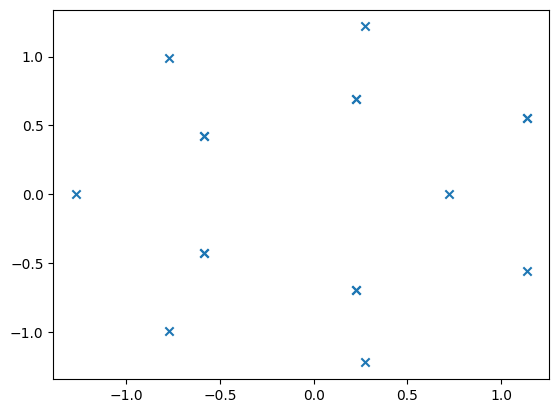
The base interface of PyZEAL is the RootFinder. To get started, import RootFinder from pyzeal.rootfinders and provide it with a target function. To calculate roots, you need to call calculateRoots with a search range. If you have not changed the default estimator, this will work without the derivative of the target function.
[1]:
from matplotlib import pyplot as plt
from pyzeal.rootfinders import RootFinder


def f(x):
    return 5 * x**4 - 3 * x**3 - 1


rf = RootFinder(f)
rf.calculateRoots((-10, 10), (-5, 5))

plt.scatter(rf.roots.real, rf.roots.imag, marker="x")

print(f"calculated roots:  {rf.roots}")
print(f"root orders     :  {rf.orders}")
calculated roots:  [-0.55705+0.j       0.13513+0.62178j  0.13513-0.62178j  0.88679+0.j     ]
root orders     :  [1 1 1 1]
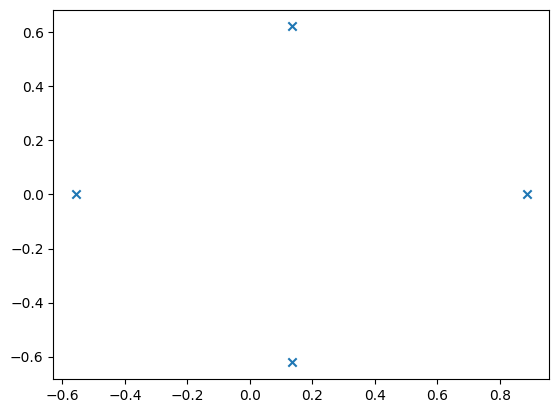
Some algorithms do however require the derivative. These may provide better performance and/or accuracy. For example, to use numerical quadrature, you need to import EstimatorTypes and pass the corresponding type to the rootfinder during setup. If the derivative is not provided, an error will be raised:
[2]:
from matplotlib import pyplot as plt
from pyzeal.pyzeal_types.estimator_types import EstimatorTypes
from pyzeal.rootfinders import RootFinder


def f(x):
    return x**12 + 5 * x**5 - 1


def df(x):
    return 12 * x**11 + 25 * x**4


rf = RootFinder(f, df, estimatorType=EstimatorTypes.QUADRATURE_ESTIMATOR)
rf.calculateRoots((-10, 10), (-5, 5))

plt.scatter(rf.roots.real, rf.roots.imag, marker="x")

print(f"calculated roots:  {rf.roots}")
print(f"root orders     :  {rf.orders}")
calculated roots:  [-0.58718-0.42313j -0.77467+0.98966j  1.13683+0.55651j  0.22656-0.69109j
 -1.26914+0.j      -0.77467-0.98966j  0.27209+1.21769j  1.13683-0.55651j
 -0.58718+0.42313j  0.27209-1.21769j  0.22656+0.69109j  0.72186+0.j     ]
root orders     :  [1 1 1 1 1 1 1 1 1 1 1 1]
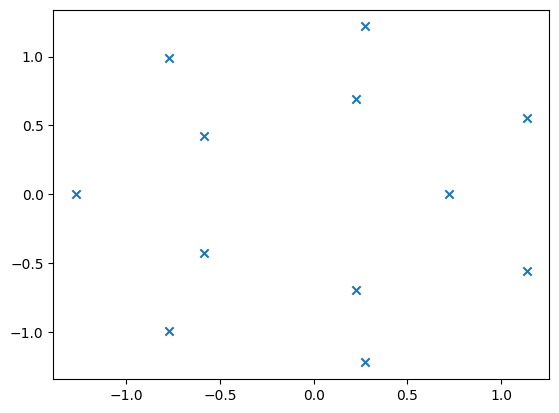
Additional settings can be passed to either the rootfinder or, depending on the concrete setting, to calculateRoots directly (if you want to apply a setting specifically for a single computational run only).
Note how in the following example all zero orders are set to 0. This is due to the NEWTON_GRID algorithm not supporting the calculation of orders.
[3]:
from matplotlib import pyplot as plt
from pyzeal.pyzeal_types.algorithm_types import AlgorithmTypes
from pyzeal.pyzeal_types.container_types import ContainerTypes
from pyzeal.rootfinders import RootFinder


def f(x):
    return x**12 + 5 * x**5 - 1


def df(x):
    return 12 * x**11 + 25 * x**4


rf = RootFinder(
    f,
    df,
    algorithmType=AlgorithmTypes.NEWTON_GRID,
    precision=(3, 3),
    containerType=ContainerTypes.ROUNDING_CONTAINER,
)
rf.calculateRoots((-10, 10), (-5, 5), precision=(6, 6))

plt.scatter(rf.roots.real, rf.roots.imag, marker="x")

print(f"calculated roots:  {rf.roots}")
print(f"root orders     :  {rf.orders}")
calculated roots:  [ 1.136833+0.55651j   0.226583+0.691124j  0.226583-0.691124j
  0.226568-0.691092j  0.721855+0.j       -0.587175+0.423125j
  0.272094+1.21769j  -0.774675-0.989668j  1.136833+0.556509j
 -0.587109-0.423232j  1.136833-0.55651j   0.272094-1.21769j
  0.226568+0.691092j -0.587175-0.423125j -0.587106+0.423236j
 -0.774675+0.989668j -1.269145+0.j      ]
root orders     :  [0 0 0 0 0 0 0 0 0 0 0 0 0 0 0 0 0]